
From Legal Transactions to Legal Momentum
Designing Rocket Lawyer's AI-native MVP that unified document workflows, AI guidance, attorney collaboration, and legal progress into one connected experience.
Rocket Lawyer was evolving from transactional legal tools into an AI + human legal service. I defined the product design direction for Rocket Lawyer's AI-native MVP, unifying document creation, AI guidance, attorney collaboration, and legal progress into one connected experience.

ROLE
Senior Product Designer / Lead Product Designer
SCOPE
AI-native MVP strategy, dashboard, document lifecycle, AI contract review, Ask Pro, Live Consult, Legal Pro response, follow-up, multi-document review, paywall handoff, workspace strategy
CONTRIBUTION
Product framing, UX strategy, system design, interaction design, trust model, MVP scoping, cross-functional alignment
CORE OUTCOME
Established Rocket Lawyer's AI + Human legal foundation.
Business Context
The business was shifting, but the product was still transactional.
Rocket Lawyer already offered document generation, attorney advice, consultations, and document management, but they existed as disconnected experiences. The opportunity wasn't to add AI, it was to connect these transactions into a guided legal service.
The strategic design challenge became: How might we help users move a legal matter forward instead of navigating disconnected tools?
User Problem
Users were not trying to use features. They were trying to resolve legal situations.
The biggest insight was that users did not think in Rocket Lawyer’s product categories. They did not naturally think, “I need to Ask an Attorney,” “I need a Consult,” or “I need to add a document into my workspace.”
“Is this clause risky?”
“Should I sign?”
“What should I negotiate?”
“Can someone real review this?”
“What happens next?”
“Am I done?”
Design implication:
This reframed the design challenge from making features easier to use to helping users understand what matters, decide what to do next, and know when AI versus a human expert was needed.

Strategic Reframing
The reframing: from legal information to legal momentum.
Understanding legal information wasn't enough. Users also needed help deciding what to do next.
I reframed the MVP around legal momentum. Every major AI or human interaction should help users answer three questions:
1. What did we find?
2. Why does it matter?
3. What should I do next?
This shifted AI from explaining legal information to helping users make confident decisions.
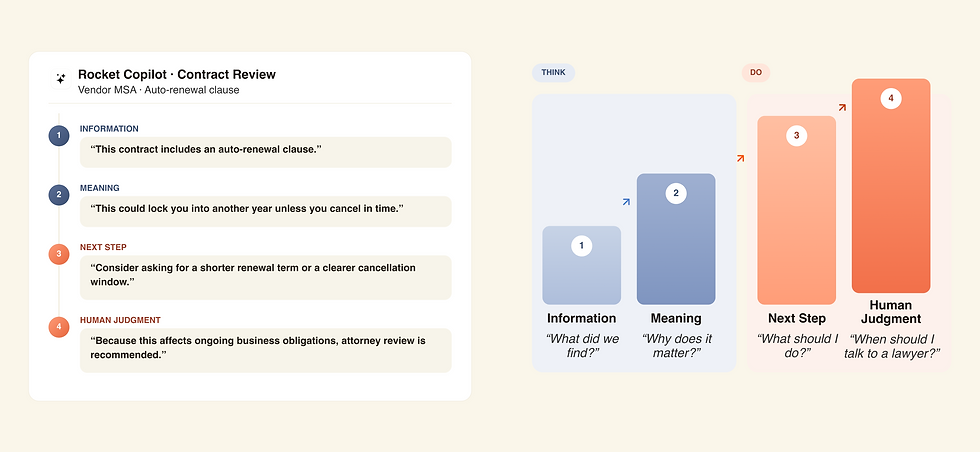
THE FRAMEWORK
Every interaction climbs four steps
Two steps to understand the situation, two steps to move it forward, escalating from information to human judgment.
THE WORKED EXAMPLE
One clause, four stages
The same framework, threaded through a real contract, review conversation.
MVP System Map
Designing the MVP as a connected AI + Human system.
Instead of treating each capability as a separate feature, I unified documents, AI, attorney collaboration, and progress into one operating model.
The system is organized into five interconnected layers:
1. Document layer: generated documents, document lifecycle, review/sign states
2. AI layer: contract review, summaries, recommendations, drafted attorney requests
3. Human expert layer: Ask an Attorney, Live Consult, Attorney response, follow-up
4. Progress layer: dashboard, status cards, pending states, notifications
5. Future matter layer: workspace, timeline, legal record, next steps

Deep Dive
Reframing the dashboard from information surface to progress signal system.
Problem: The dashboard could easily become a collection of documents, conversations, consults, and updates. But Users returned to check whether their legal matter had progressed, not to browse product categories.
Design decision: I redesigned the dashboard around legal movement: what changed, what needs attention, and what users should do next.
This repositioned the dashboard from a feature menu into the user’s progress surface for Rocket Lawyer's legal workflow.
What changed:
-
Legal Pro responses became high-priority trust signals.
-
AI Paralegal summaries were framed as “what this means for you."
-
Document cards shifted from file previews to lifecycle states.
-
CTAs became outcome-specific: View response, Review & sign, Reschedule, Open conversation.
-
Dashboard became the DO mode surface: action and reassurance first, deeper reasoning later.

Deep Dive
Designing the bridge between AI guidance and human legal judgment.

Problem: Users didn't know when AI was enough and when they should escalate to a human attorney.
Design decision: I designed a progressive escalation model where AI prepares the request and users decide whether they need a written response or live consultation.
What changed:
-
Ask Pro vs. Consult framed by written vs. live, exploration vs. commitment.
-
AI drafts the attorney question; user reviews and edits before submitting.
-
Legal Pro response shown with AI interpretation layer “what this means for you”.
-
Pending state designed to hold user trust while waiting for attorney response.
-
No availability recovery state prevents dead ends in Consult scheduling.
This repositioned attorney escalation from a disconnected upsell into a natural continuation of the AI workflow.
Deep Dive
Turning documents from static outputs into workflow objects.
Problem: Documents lacked status, context, and clear next actions after creation.
Design decision: I redesigned documents as workflow artifacts with visible lifecycle states and recommended next actions.
This repositioned documents from an endpoint into the starting point for the next legal action.
What changed:
-
Documents gained lifecycle states instead of just file names.
-
Primary and supporting document roles made multi-doc review clearer.
-
AI selects the primary document, with user ability to change it.
-
Documents connect forward into the matter workspace as artifacts.

Design Principles
Principles I introduced to guide the MVP.
1
Progress before organization
Do not lead with product categories. Lead with movement.
2
AI interprets, humans validate
AI can summarize, explain, draft, and recommend. Licensed experts provide judgment and accountability.
3
Conversation explains, structured UI commits
Chat is useful for exploration, but payment, scheduling, submission, and review scope need structured UI.
4
Recommendation reduces effort; reversibility preserves trust
The system should recommend a path, but users must be able to change it before commitment.
5
Dashboard is DO mode; detail is THINK mode
Users need fast progress signals first, then deeper reasoning when they choose to go in.
MVP Scoping
How I decided what belonged in MVP.
Because the MVP could not become a full legal operating system immediately, I evaluated features through a simple product lens:
Does this create legal momentum?
Does it reduce the user’s next decision?
Does it clarify AI vs human responsibility?
Does it protect trust?
Does it support the new business model?
Can it ship honestly within MVP constraints?
Outcomes
Helping users move legal matters forward
Increase in Copilot engagement
Monthly active Copilot users
AI conversations started
AI responses delivered
AI to Attorneys connections (7.7% conversion)
Strategic Design Impact:
-
Established Rocket Lawyer's first connected AI + Human legal workflow across document creation, AI guidance, attorney collaboration, and future workspace architecture.
-
Defined the interaction model and design principles that became the foundation for subsequent Copilot experiences.
-
Shifted the product strategy from disconnected legal tools to a unified, AI-assisted legal service.
Market Context
Why this work matters beyond the funnel
This project wasn't just about improving document completion. It was about expanding access to legal help by combining AI guidance with licensed attorneys in one connected experience. As millions of small businesses continue to navigate legal problems without affordable support, reducing friction isn't only a usability improvement, it helps more people actually get protected.
U.S. small businesses, 99.9% of all companies, most without easy access to affordable legal support.
Average cost of traditional legal counsel, out of reach for most individuals and small businesses.

"Expanding Opportunity: How Legal Access Is Evolving for America's Small Businesses"
— Acumen Stories, July 2026.
Every friction point removed increases the likelihood that someone leaves with legal protection instead of an unfinished document.
Reflection
What I learned
1. Design around the unit of value
AI-native products shouldn't be organized around features, they should be organized around what users are actually trying to accomplish.
Going forward: I'll start every project by identifying the user's unit of value first, then design every screen to help that value progress.
2. Every surface should create momentum
Each interaction should answer four questions: What matters? What changed? What should I do next? When is human judgment needed?
Going forward: I'll use these four questions as a design checklist for every AI workflow and critical user journey.
3. AI should drive progress, not just provide answers
The best AI experiences help users move work forward instead of simply generating content or responding to prompts.
Going forward: I'll design AI features that reduce friction, guide decisions, and keep users moving toward meaningful outcomes.
The work shifted the product story from “AI legal help” to “legal momentum.”